
ID & State Preservation
Every trans-unit ID, segment state (new, translated, reviewed), and metadata attribute stays exactly as in the original XLIFF file.
Upload your XLIFF file and get accurate translation in 100+ languages. IDs, segments, states, notes, and placeholders - all preserved. XLIFF 1.2 and 2.0 supported.
Translation example
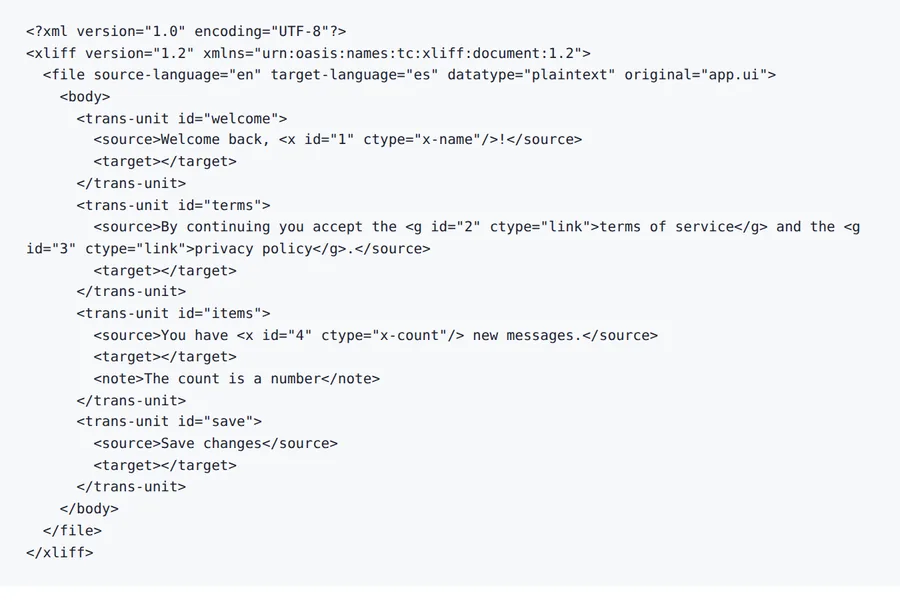
A four-unit XLIFF written for this page, with an inline <x/> placeholder and two <g> links. The <source> text is left alone, each <target> is filled in, and the inline tags come back in the same places.
Source
Result
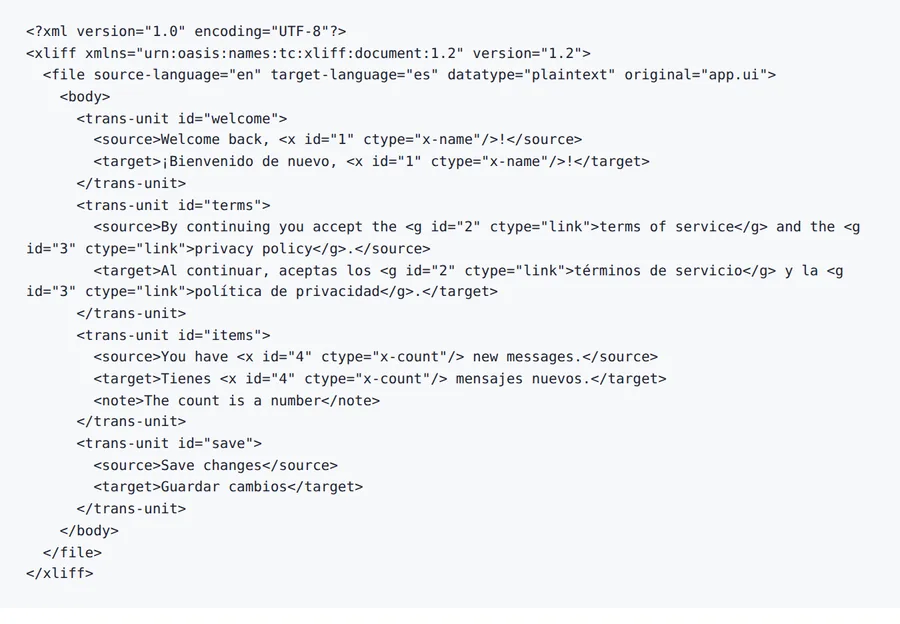
Same <x id="1"/> and <g id="2"> elements, same ids.
target-language="es"
2026-10-08 verified — Amanda Lee
Every trans-unit ID, segment state (new, translated, reviewed), and metadata attribute stays exactly as in the original XLIFF file.
Inline elements (bpt, ept, ph, x, mrk), variables, and markup references are detected and preserved. Your app logic works in every language.
Cloud-based AI processes complex localization files with thousands of segments.
Translate XLIFF files between 100+ languages including Spanish, French, German, Arabic, Chinese, Japanese, and Korean.
Need to translate an XLIFF file without losing segment IDs, translation states, or developer notes? ForgeFile is an AI-powered XLIFF translator that converts your localization files into 100+ languages while preserving every trans-unit ID, segment state, context note, and placeholder. Whether it's a web app, a mobile project, or an enterprise platform, your translated XLIFF is CI/CD ready and imports directly into your build pipeline.
Our translation engine understands the XLIFF standard natively. When you translate an XLIFF file, ForgeFile:
The result is a valid XLIFF file you can import directly into your TMS, CAT tool, or CI/CD pipeline - no manual segment editing needed.
ForgeFile handles both XLIFF versions with their specific semantics:
ForgeFile handles the XLIFF workflows localization professionals rely on:
Batch upload and API access are available for continuous localization pipelines. All files are encrypted in transit and at rest - fully GDPR-compliant.
Upload your XLIFF file now for accurate, standards-compliant XLIFF translation.
XLIFF is standardized by OASIS - see the XLIFF 2.1 specification.
Upload Your XLIFF File
Drag and drop your .xliff or .xlf file. We support both XLIFF 1.2 and 2.0 versions for all localization projects.
Select Source & Target Language
Choose from 100+ languages. ForgeFile reads context notes and source text for accurate, context-aware translations.
Configure Translation Settings
Choose whether to update translation states and language attributes. Select which segments to translate (all, untranslated only, or specific states).
Download Your Translated XLIFF
Your translated XLIFF is ready in minutes. All IDs, states, and segments are preserved - import directly into your TMS or build pipeline.
Upload your .xliff or .xlf file to ForgeFile, select your target language, and click Translate. Our AI fills in target segments while preserving all IDs, states, and metadata.
Absolutely. ForgeFile preserves every trans-unit ID, segment state (new, translated, reviewed, final), and metadata attribute exactly as in the original.
Yes. ForgeFile detects and protects all XLIFF inline elements including bpt, ept, ph, x, and mrk tags, as well as variable references and markup.
Yes. Both XLIFF versions are handled natively with their specific semantics - trans-units for 1.2 and segments/units for 2.0.
Yes. ForgeFile can selectively translate only segments with empty targets or specific states, leaving already-translated segments untouched.
Yes. ForgeFile handles XLIFF files exported from Xcode, Android Studio, and popular i18n frameworks like react-intl, Angular i18n, and Symfony Translation.
Files are encrypted in transit and at rest. How long they are kept depends on your plan.
XLIFF is the industry standard for professional translation workflows with support for states, notes, and bilingual segments. JSON is simpler and common in web apps. ForgeFile handles both natively.
Upload your XLIFF file and get CI/CD-ready translated output in minutes. IDs, states, and segments preserved, every time.