
Plural Form Handling
Correct plural forms generated automatically for every target language. Plural-Forms header and nplurals expression updated in the PO header.
Upload your .po file and get accurate translation in 100+ languages. Msgid, msgstr, plural forms, context, and comments - all preserved. Gettext compatible.
Translation example
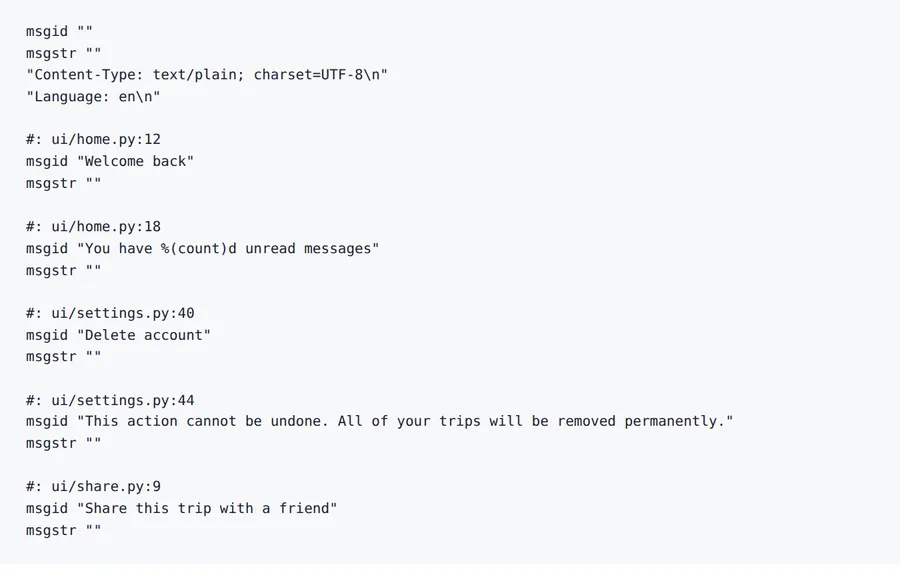
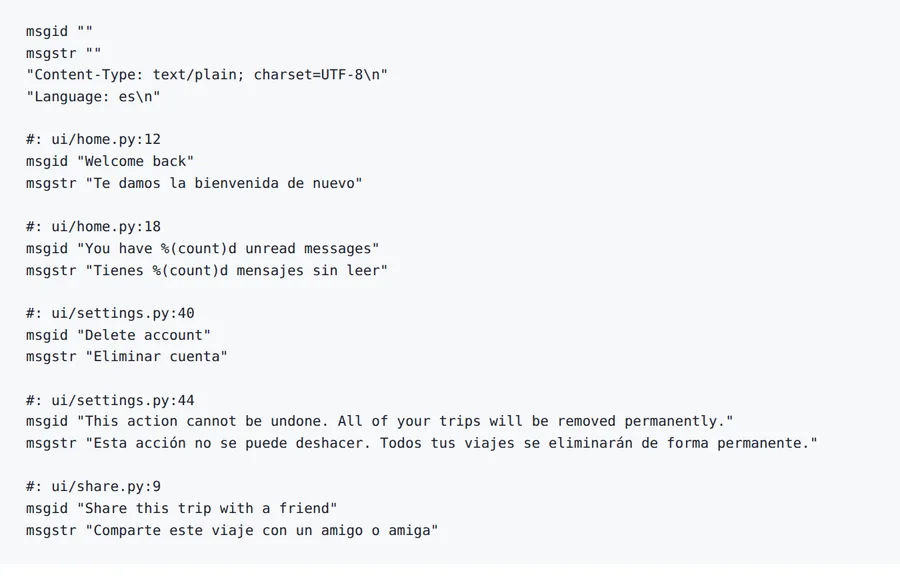
A five-message catalogue written for this page. The msgid lines and file references are untouched, each msgstr is filled in, and the %(count)d placeholder survives.
Source
Result
2026-10-08 verified — Amanda Lee
Correct plural forms generated automatically for every target language. Plural-Forms header and nplurals expression updated in the PO header.
Message context (msgctxt), translator comments, extracted comments, and flags are preserved exactly as in the original catalog.
Most PO files are translated in seconds. Cloud-based AI handles catalogs with thousands of strings and complex plural rules.
Translate PO files between 100+ languages including Spanish, French, German, Arabic, Chinese, Japanese, and Korean.
Need to translate a PO file without losing plural forms, message context, or translator comments? ForgeFile is an AI-powered gettext PO translator that converts your localization catalogs into 100+ languages while preserving every msgid, msgstr, plural rule, msgctxt, and comment. Whether it's a WordPress plugin, a GNOME application, or a custom PHP project, your translated PO file compiles to MO and deploys without changes.
Our translation engine understands the GNU gettext format natively. When you translate a PO file, ForgeFile:
The result is a valid PO file you can compile to MO and deploy directly - no manual editing of plural forms or placeholders needed.
Plural rules vary dramatically across languages. ForgeFile handles them all:
ForgeFile handles the PO files the open-source ecosystem relies on:
Batch upload and API access are available for continuous localization pipelines. All files are encrypted in transit and at rest - fully GDPR-compliant.
The PO file format is documented in the GNU gettext manual.
Upload Your PO or POT File
Drag and drop your .po or .pot file. We support gettext catalogs from WordPress, PHP frameworks, GNOME, and custom software projects.
Select Source & Target Language
Choose from 100+ languages. ForgeFile applies the correct plural rules and nplurals expression for your target language automatically.
Configure Translation Settings
Choose whether to translate only empty msgstr entries or all strings. Select whether to update the PO header metadata.
Download Your Translated PO File
Your translated PO file is ready in seconds. Compile to MO and deploy - all plurals, context, and comments are preserved.
Upload your .po or .pot file to ForgeFile, select your target language, and click Translate. Our AI fills in msgstr entries while preserving all structure, plurals, and context - typically in seconds.
Yes. ForgeFile generates the correct number of plural forms for each target language (e.g., 2 for English, 3 for Russian, 6 for Arabic) and updates the Plural-Forms header automatically.
Absolutely. ForgeFile detects and protects %s, %d, %1$s, and other printf-style placeholders, as well as HTML markup within strings.
Yes. ForgeFile accepts both .po and .pot files. You can translate directly from a template file without creating a pre-filled PO file first.
Yes. ForgeFile handles WordPress .po files natively. The output is compatible with GlotPress, Loco Translate, and direct deployment to wp-content/languages.
Yes. ForgeFile can selectively translate only empty msgstr entries, leaving already-translated strings untouched - perfect for incremental localization.
Files are encrypted in transit and at rest. How long they are kept depends on your plan.
PO (gettext) is the standard for PHP, WordPress, and GNU/Linux software. XLIFF is the industry standard for enterprise apps and TMS tools. ForgeFile handles both natively with full structure preservation.
Upload your PO file and get gettext-compatible translated output in seconds. Plurals, context, and comments preserved, every time.