
Resource Key Preservation
Resource names are never translated or modified. Every key, data type, and mimetype attribute stays exactly as in the original .resx file.
Upload your .resx file and get accurate translation in 100+ languages. Keys, data types, comments, and XML schema - all preserved. Visual Studio ready.
Translation example
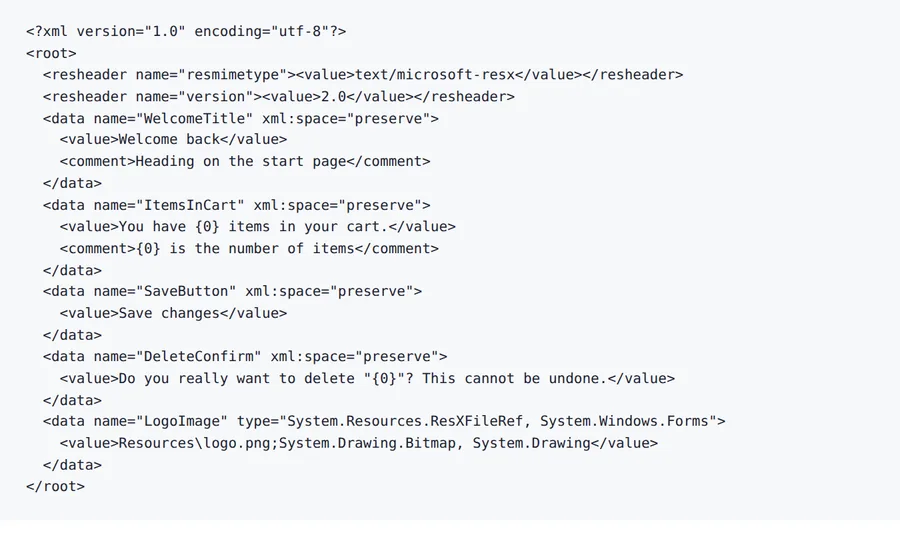
A five-entry resource file written for this page: titles, a string with a {0} placeholder, a confirmation with quotes and a picture reference that is not text. Keys, comments and the file reference stay; the strings are translated.
Source
Result
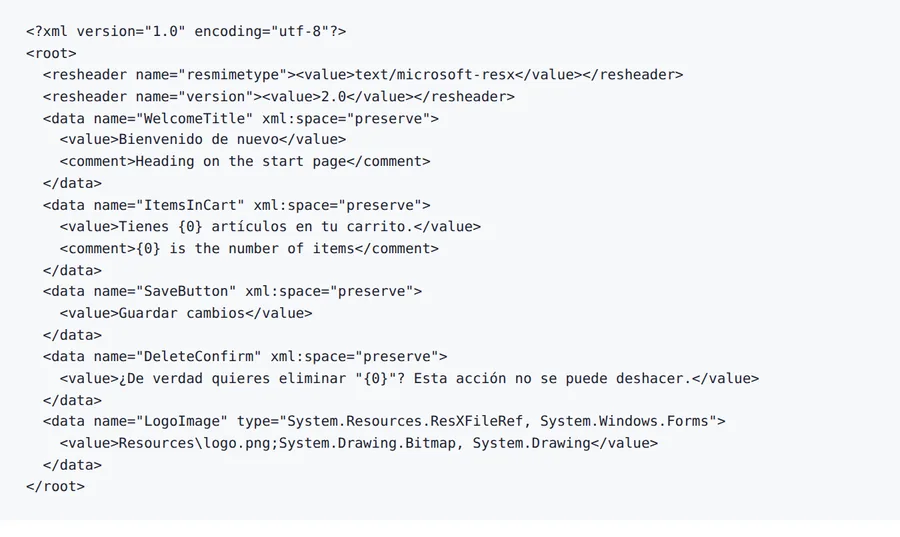
4 of 4 strings that contain words differ from the source.
The ResXFileRef entry (Resources\logo.png) is byte for byte the same.
Comments are notes for translators and stay in English.
2026-10-08 verified — Amanda Lee
Resource names are never translated or modified. Every key, data type, and mimetype attribute stays exactly as in the original .resx file.
XML schema headers, resheaders, and developer comments are preserved exactly. Your translated RESX compiles without errors.
Most RESX files are translated in seconds. Cloud-based AI handles resource files with hundreds of string entries.
Translate RESX files between 100+ languages including Spanish, French, German, Arabic, Chinese, Japanese, and Korean.
Need to translate a .resx file without breaking resource keys, data types, or XML schema? ForgeFile is an AI-powered .NET resource translator that converts your RESX files into 100+ languages while preserving every resource name, data type, comment, and schema definition. Whether it's a WPF application, an ASP.NET website, or a .NET MAUI app, your translated RESX compiles and deploys without changes.
Our translation engine understands the .NET resource format. When you translate a RESX file, ForgeFile:
The result is a valid .resx file you can add to your Visual Studio project - no schema errors, no missing keys.
ForgeFile handles all RESX-specific elements:
ForgeFile handles the RESX files .NET developers work with:
Batch upload and API access are available for CI/CD pipeline integration. All files are encrypted in transit and at rest - fully GDPR-compliant.
Upload your RESX file now for accurate, schema-safe resource translation.
The .resx file format is documented on Microsoft Learn.
Upload Your RESX File
Drag and drop your .resx file. We support resource files from Visual Studio, Rider, and any .NET development environment.
Select Source & Target Language
Choose from 100+ languages. ForgeFile understands .NET UI patterns and translates labels, messages, and error text accurately.
Configure Translation Settings
Choose whether to translate comments. Select which resource types to include (strings only, or all translatable values).
Download Your Translated RESX
Your translated RESX is ready in seconds. Add it to your Visual Studio project as Resources.es.resx, Resources.fr.resx, etc.
Upload your .resx file to ForgeFile, select your target language, and click Translate. Our AI translates value elements while preserving all resource names, types, and schema - typically in seconds.
No. ForgeFile translates only values. Resource names, data types, and mimetype attributes are never modified or reordered.
Yes. ForgeFile detects and protects {0}, {1:C}, {2:dd/MM/yyyy}, and other .NET formatting placeholders in translated values.
Yes. The translated RESX file is fully compatible with Visual Studio. Name it following .NET conventions (e.g., Resources.es.resx) and add it to your project.
Yes. ForgeFile handles RESX files from WPF, WinForms, ASP.NET, Blazor, .NET MAUI, and Xamarin projects with full schema preservation.
Yes. All comment elements are preserved in the translated file, maintaining context for your development team.
Files are encrypted in transit and at rest. How long they are kept depends on your plan.
RESX is the native Visual Studio resource format with XML schema and data type support. JSON is used in ASP.NET Core with IStringLocalizer. ForgeFile handles both natively.
Upload your RESX file and get Visual Studio-ready translated output in seconds. Keys, types, and schema preserved, every time.