
Tag & Schema Preservation
Every XML tag, attribute, namespace, and nesting level stays intact. Your translated file is well-formed, valid, and ready for production.
Upload any XML file and get an accurate translation in 100+ languages. Tags, attributes, namespaces, and CDATA sections - all preserved.
Translation example
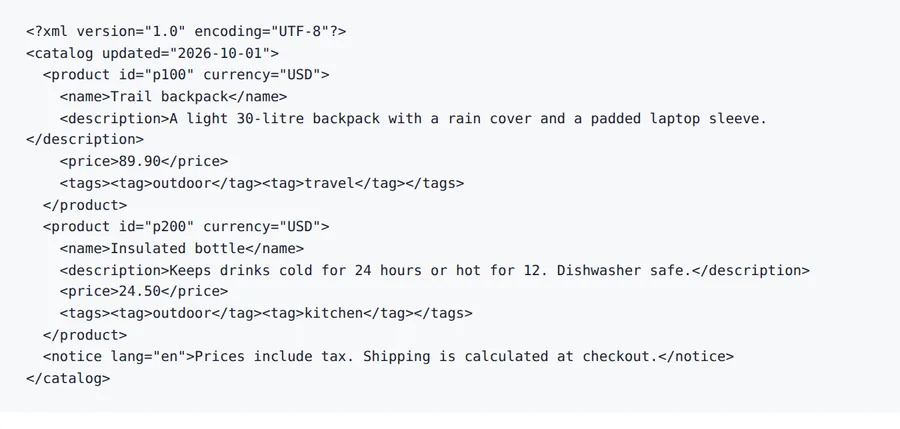
A two-product catalogue written for this page, with attributes, prices, tags and a notice. Element and attribute names, ids, currency and prices stay; the text values are translated and the lang attribute follows the text.
Source
Result
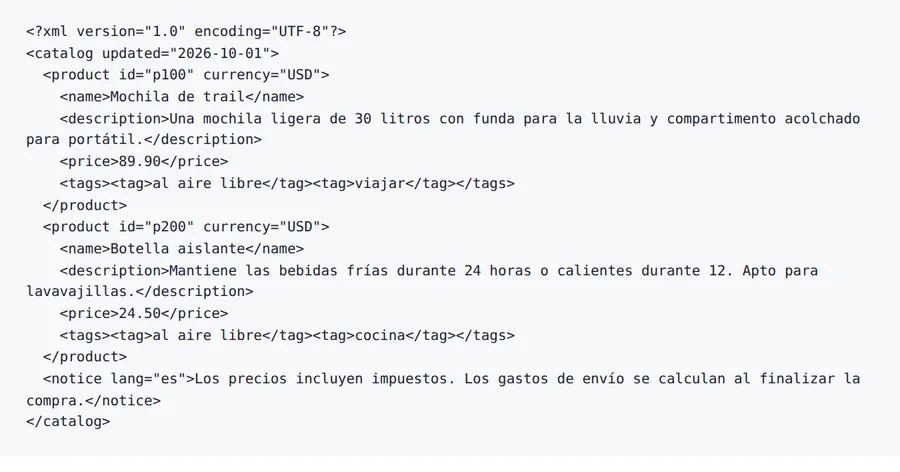
id and currency come back as they were.
89.90, 24.50 are identical to the source.
lang="en" → lang="es"
9 of 9 text values differ from the source.
2026-10-08 verified — Amanda Lee
Every XML tag, attribute, namespace, and nesting level stays intact. Your translated file is well-formed, valid, and ready for production.
CDATA sections, entity references, and processing instructions are handled correctly. No unintended escaping or data corruption.
Cloud-based AI handles large data feeds and complex document hierarchies.
Translate XML files between 100+ languages including Spanish, French, German, Arabic, Chinese, Japanese, and Korean.
Need to translate an XML file without breaking your schema or data structure? ForgeFile is an AI-powered XML translator that converts your data files into 100+ languages while preserving every tag, attribute, namespace, and CDATA section. Whether it's an API response, a product feed, a config file, or app localization strings, your translated XML is well-formed and ready for production.
Our translation engine parses XML structure before translating. When you translate an XML file, ForgeFile:
The result is a well-formed, valid XML file you can deploy directly - no broken schemas, no missing closing tags.
Unlike generic text translators, ForgeFile understands XML semantics:
ForgeFile handles the XML files technical teams work with every day:
Bulk translation and API access are available for automated CI/CD pipelines. All files are encrypted in transit and at rest - fully GDPR-compliant.
XML syntax is defined by the W3C XML specification.
Upload Your XML File
Drag and drop your . xml file, or browse to select it. The maximum file size depends on your plan.
Select Source & Target Language
Choose from 100+ languages. ForgeFile auto-detects the source language and identifies translatable text nodes in your XML structure.
Configure Translation Settings
Choose which elements and attributes to translate. Select output encoding and whether to preserve XML declaration and comments.
Download Your Translated XML
Your translated XML is ready in minutes. All tags, attributes, namespaces, and structure are preserved - deploy directly to your system.
Upload your XML file to ForgeFile, select your target language, and click Translate. Our AI identifies text nodes and translates them while preserving all tags, attributes, and schema structure.
Absolutely. ForgeFile parses the full DOM tree and translates only text content. All tags, attributes, namespaces, nesting, and element order remain untouched.
Yes. XML namespaces, prefixes, and schema references are preserved exactly. The translated file remains valid against the same schema as the original.
CDATA sections are recognized and handled correctly. Text inside CDATA is translated while the CDATA markers are preserved without unintended escaping.
Yes. ForgeFile handles Android strings.xml, iOS plists, and other app localization XML formats with full structure preservation.
For larger files or automated CI/CD pipelines, contact us about enterprise plans with API access and higher limits. The maximum file size depends on your plan.
Files are encrypted in transit and at rest. How long they are kept depends on your plan.
XML uses tags and attributes for structure, JSON uses key-value pairs. ForgeFile handles both natively - preserving tags and namespaces for XML, and keys and nesting for JSON.
Upload your XML file and get well-formed translated output in minutes. Tags, attributes, and schema preserved, every time.