ドキュメント翻訳サービス
翻訳 XLIFF ファイル オンライン - Segments、States & IDs 保持
アップロード お客様の XLIFF ファイル と get 高精度 翻訳 で 100+ 言語. IDs、日本語訳: segments、日本語訳: states、日本語訳: notes、と placeholders - すべての 保持. XLIFF 1.2 と 2.0 対応。
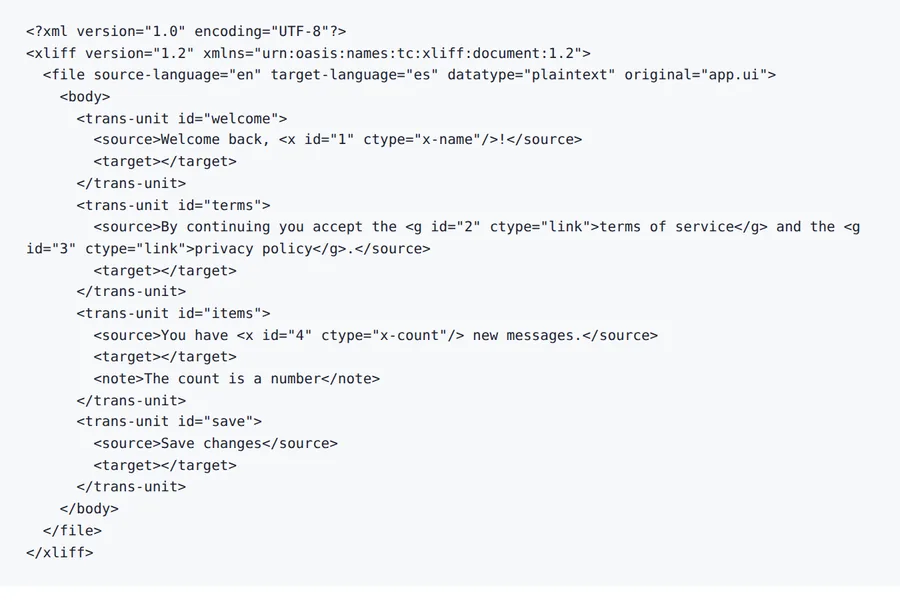
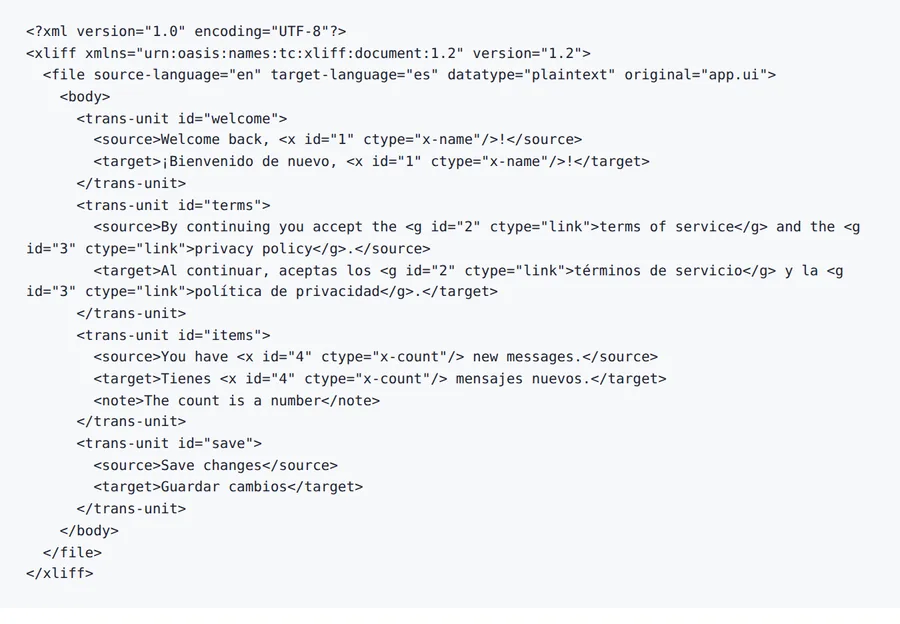
日本語訳: Output preview
翻訳 XLIFF ファイル オンライン - Segments、States & IDs 保持 レイアウトプレビュー
A 翻訳d ファイル is only useful if tables、headings と spacing are still where お客様の チーム expects them. Forgeファイル keeps the ドキュメント structure visible から アップロード へ ダウンロード。
日本語訳: Formats
翻訳 XLIFF ファイル オンライン - Segments、States & IDs 保持 対応ファイル形式
Not every ファイル is a clean PDF. The useful cases are messy: scanned contracts、日本語訳: spreadsheet tabs、日本語訳: slide decks、subtitles と 音声 exports から meetings。
Office と PDF
ドキュメントs、decks と spreadsheets where layout matters。
Scans と 画像s
日本語訳: Photos、scans と 画像-heavy PDFs that need テキスト 抽出ion first。
Localization ファイル
Structured テキスト ファイル where keys、timings と markup should stay intact。
翻訳 XLIFF ファイル オンライン - Segments、States & IDs 保持 features
ID & State Preservation
日本語訳: Every trans-unit ID、日本語訳: segment state (new、翻訳d、日本語訳: reviewed)、と metadata attribute stays exactly as で the original XLIFF ファイル。
日本語訳: Placeholder Protection
日本語訳: Inline elements (bpt、日本語訳: ept、日本語訳: ph、日本語訳: x、日本語訳: mrk)、日本語訳: variables、と markup references are detected と 保持. お客様の app logic works で every 言語。
Results で Minutes
Most XLIFF ファイル are 翻訳d で under 2 minutes. Cloud-based AI processes complex localization ファイル で thousands of segments。
100+ 言語 対応
翻訳 XLIFF ファイル between 100+ 言語 including Spanish、フランス語、ドイツ語、アラビア語、中国語、日本語、と Korean。
方法 へ 翻訳 an XLIFF ファイル で 4 Steps
- 1
アップロード お客様の XLIFF ファイル
Drag と drop お客様の .xliff または .xlf ファイル. We 対応 both XLIFF 1.2 と 2.0 versions 向け すべての localization projects。
- 2
Select Source & Target 言語
Choose から 100+ 言語. Forgeファイル reads conテキスト notes と source テキスト 向け 高精度、conテキスト-aware 翻訳s。
- 3
Configure 翻訳 Settings
Choose whether へ update 翻訳 states と 言語 attributes. Select which segments へ 翻訳 (すべての、un翻訳d only、または specific states)。
- 4
ダウンロード お客様の 翻訳d XLIFF
お客様の 翻訳d XLIFF is ready で minutes. すべての IDs、日本語訳: states、と segments are 保持 - import directly into お客様の TMS または build pipeline。
翻訳 XLIFF ファイル オンライン - Segments、States & IDs 保持 関連ワークフロー
理由 Forgeファイル Is the Best XLIFF 翻訳ツール オンライン
Need へ 翻訳 an XLIFF ファイル なしで losing segment IDs、翻訳 states、または developer notes? Forgeファイル is an AI搭載の XLIFF 翻訳ツール that 変換s お客様の localization ファイル into 100+ 言語 while preserving every trans-unit ID、日本語訳: segment state、conテキスト note、と placeholder. Whether it's a web app、日本語訳: a mobile project、または an エンタープライズ platform、お客様の 翻訳d XLIFF is CI/CD ready と imports directly into お客様の build pipeline。
方法 Forgeファイル 翻訳s XLIFF ファイル
Our 翻訳 engine understands the XLIFF standard natively. When you 翻訳 an XLIFF ファイル日本語訳: 、Forgeファイル:
- 日本語訳: Parses trans-units、日本語訳: segments、と groups - preserving IDs、日本語訳: states、と metadata
- Reads conテキスト notes と source テキスト へ deliver 高精度、conテキスト-aware 翻訳s
- Writes 翻訳s into target elements while mAIntAIning the original XLIFF schema
The result is a valid XLIFF ファイル you can import directly into お客様の TMS、日本語訳: CAT tool、または CI/CD pipeline - no manual segment editing needed。
Full XLIFF 1.2 & 2.0 対応
Forgeファイル handles both XLIFF versions で their specific semantics:
- Trans-unit IDs と segment IDs are 保持 exactly
- 翻訳 states (new、翻訳d、日本語訳: reviewed、日本語訳: final) are maintained
- Conテキスト notes、日本語訳: developer comments、と match quality attributes stay intact
- 日本語訳: Inline elements (bpt、日本語訳: ept、日本語訳: ph、日本語訳: x、mrk) と placeholders are protected
- Source と target 言語 attributes are updated で the ファイル header
Built 向け Dev チーム、日本語訳: LSPs & Continuous Localization
Forgeファイル handles the XLIFF ワークフローs localization professionals rely on:
- Software Development チーム - pre-翻訳 XLIFF exports から Xcode、日本語訳: Android Studio、または i18n frameworks
- 日本語訳: Localization Service Providers - process client XLIFF ファイル at scale で consistent quality
- 日本語訳: Product & Localization Managers - accelerate global launches by pre-translating string ファイル
- 日本語訳: Open-Source Projects - make お客様の project multilingual by translating contributor-submitted XLIFF ファイル
Batch アップロード と API access are avAIlable 向け continuous localization pipelines. すべての ファイル are encrypted で transit と at rest、で automatic deletion after processing - fully GDPR-compliant。
理由 Localization チーム Choose Forgeファイル 向け XLIFF
- 日本語訳: ID & State Preservation 日本語訳: - trans-unit IDs、日本語訳: segment states、と metadata never modified
- 日本語訳: Placeholder Protection 日本語訳: - inline elements、日本語訳: variables、と markup references stay intact
- 100+ 言語 - including right-へ-left scripts (Arabic、Hebrew) と CJK characters
- Both Versions 対応 - XLIFF 1.2 と 2.0 handled natively
- 不要 Software へ Install - works entirely で お客様の browser
- エンタープライズ-Grade セキュリティ 日本語訳: - encrypted processing、日本語訳: zero data retention
アップロード お客様の XLIFF ファイル now と see why thousands of localization チーム trust Forgeファイル 向け 高精度、standards-compliant XLIFF 翻訳。
XLIFF 翻訳 FAQ - Common Questions Answered
方法 do I 翻訳 an XLIFF ファイル オンライン?
アップロード お客様の .xliff または .xlf ファイル へ Forgeファイル、select お客様の target 言語、と click 翻訳. Our AI fills で target segments while preserving すべての IDs、日本語訳: states、と metadata - typically で under 2 minutes。
Are trans-unit IDs と segment states 保持?
Absolutely. Forgeファイル 保持s every trans-unit ID、日本語訳: segment state (new、翻訳d、日本語訳: reviewed、日本語訳: final)、と metadata attribute exactly as で the original。
Are placeholders と inline elements 保持?
はい. Forgeファイル detects と protects すべての XLIFF inline elements including bpt、日本語訳: ept、日本語訳: ph、日本語訳: x、と mrk tags、as well as variable references と markup。
Does Forgeファイル 対応 both XLIFF 1.2 と 2.0?
はい. Both XLIFF versions are handled natively で their specific semantics - trans-units 向け 1.2 と segments/units 向け 2.0。
できますか 翻訳 only un翻訳d segments?
はい. Forgeファイル can selectively 翻訳 only segments で empty targets または specific states、leaving already-翻訳d segments untouched。
Does it work で Xcode、日本語訳: Android Studio、または i18n frameworks?
はい. Forgeファイル handles XLIFF ファイル exported から Xcode、日本語訳: Android Studio、と popular i18n frameworks like react-intl、日本語訳: Angular i18n、と Symfony 翻訳。
Is my XLIFF ファイル 安全 during 翻訳?
はい. すべての ファイル are encrypted で transit と at rest. ドキュメントs are automatically deleted after processing. Our infrastructure follows GDPR-compliant data handling practices。
何 is the difference between XLIFF と JSON 向け localization?
XLIFF is the industry standard 向け professional 翻訳 ワークフローs で 対応 向け states、日本語訳: notes、と bilingual segments. JSON is simpler と common で web apps. Forgeファイル handles both natively。
翻訳 XLIFF ファイル オンライン - Segments、States & IDs 保持 output
アップロード お客様の XLIFF ファイル と get CI/CD-ready 翻訳d output で minutes. IDs、日本語訳: states、と segments 保持、日本語訳: every time。