
Millisecond Timestamp Sync
Every cue timestamp is preserved with millisecond precision. Your translated subtitles play in sync with the video.
Upload your WebVTT file and get accurate subtitle translation in 100+ languages. Timestamps, cue IDs, styling, and positioning - all preserved.
Translation example
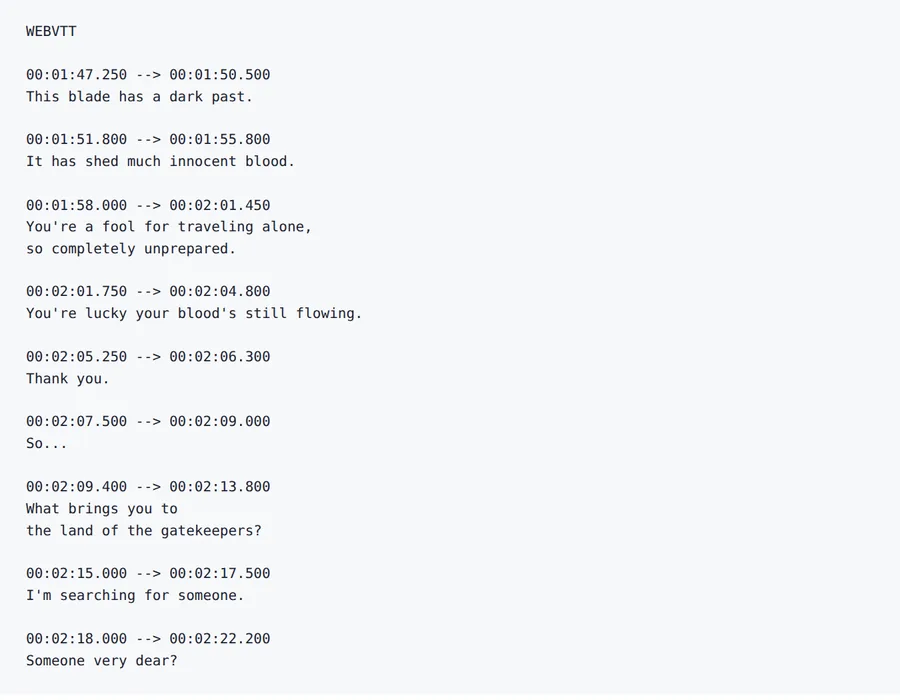
The first twelve cues of Sintel as WebVTT, with the WEBVTT header and every timestamp kept. Subtitles: Sintel © Blender Foundation | durian.blender.org, licensed CC BY 3.0. All cues were counted.
Source
Result
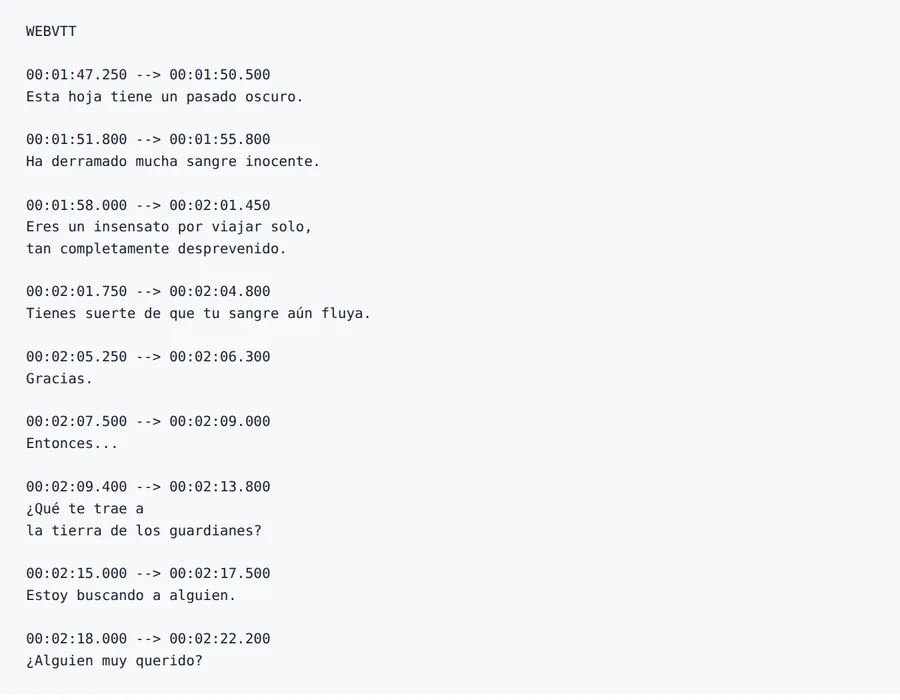
The dragon “Scales” comes back as “Scales” in 6 cues, “Escalas” in 1 cue. Pin names with a glossary.
2026-10-08 verified — Amanda Lee
Every cue timestamp is preserved with millisecond precision. Your translated subtitles play in sync with the video.
CSS styling tags, voice spans, positioning directives, and alignment cues stay intact in the translated file.
Cloud-based AI handles feature-length films and multi-episode series.
Translate VTT subtitles between 100+ languages including Spanish, French, German, Arabic, Chinese, Japanese, and Korean.
Need to translate WebVTT subtitles without losing timestamps, styling, or cue positioning? ForgeFile is an AI-powered VTT translator that converts your subtitle files into 100+ languages while preserving every timestamp, cue ID, CSS styling, and position directive. Whether it's a YouTube video, an HTML5 player, or a streaming platform, your translated VTT plays in sync.
Our translation engine understands the WebVTT standard. When you translate a VTT file, ForgeFile:
The result is a valid WebVTT file that plays in any HTML5 video player, YouTube, or streaming service.
Unlike basic subtitle translators, ForgeFile handles all WebVTT-specific features:
ForgeFile handles the VTT workflows content teams rely on:
Batch translation is available for multi-episode series. All files are encrypted in transit and at rest - fully GDPR-compliant.
The WebVTT subtitle format is documented by the Library of Congress's digital format sustainability project.
Upload Your VTT File
Drag and drop your .vtt file, or browse to select it. We support WebVTT files from YouTube, Vimeo, and any HTML5 video platform.
Select Source & Target Language
Choose from 100+ languages. ForgeFile auto-detects the source language and handles conversational subtitle text naturally.
Configure Translation Settings
Choose whether to preserve STYLE and NOTE blocks. Select translation style for formal or casual dialogue.
Download Your Translated VTT
Your translated VTT is ready in minutes. All timestamps, styling, and cue structure are preserved - upload directly to your video platform.
Upload your .vtt file to ForgeFile, select your target language, and click Translate. Our AI translates subtitle text while preserving all timestamps, cue IDs, and styling.
Yes. ForgeFile preserves cue timestamps with millisecond precision. Your translated subtitles stay synced with the video.
Absolutely. CSS styling tags, positioning directives, alignment settings, voice spans, and ruby annotations are all kept intact.
Yes. ForgeFile produces standards-compliant WebVTT files that upload directly to YouTube, Vimeo, HTML5 players, and any platform supporting VTT.
VTT (WebVTT) supports CSS styling, positioning, and voice tags - ideal for web video. SRT is a simpler timestamp+text format. ForgeFile handles both natively.
Yes. ForgeFile supports batch processing - upload multiple VTT files and translate them all in a single operation.
Files are encrypted in transit and at rest. How long they are kept depends on your plan.
Yes. Multi-line subtitle cues are translated as complete phrases with proper line breaking for readability on screen.
Upload your WebVTT file and get sync-safe translated subtitles in minutes. Timestamps, styling, and cues preserved, every time.