Document translation service

Translate Word Documents Online — Styles, Tables & Track Changes

Upload any DOC or DOCX file and get an accurate translation in 100+ languages. Styles, tables, images, comments and track changes — all preserved exactly as in the original.

Secure processing Fast results No setup required
100+ Languages supported
Formatting Workflow quality controls
GDPR Secure private processing

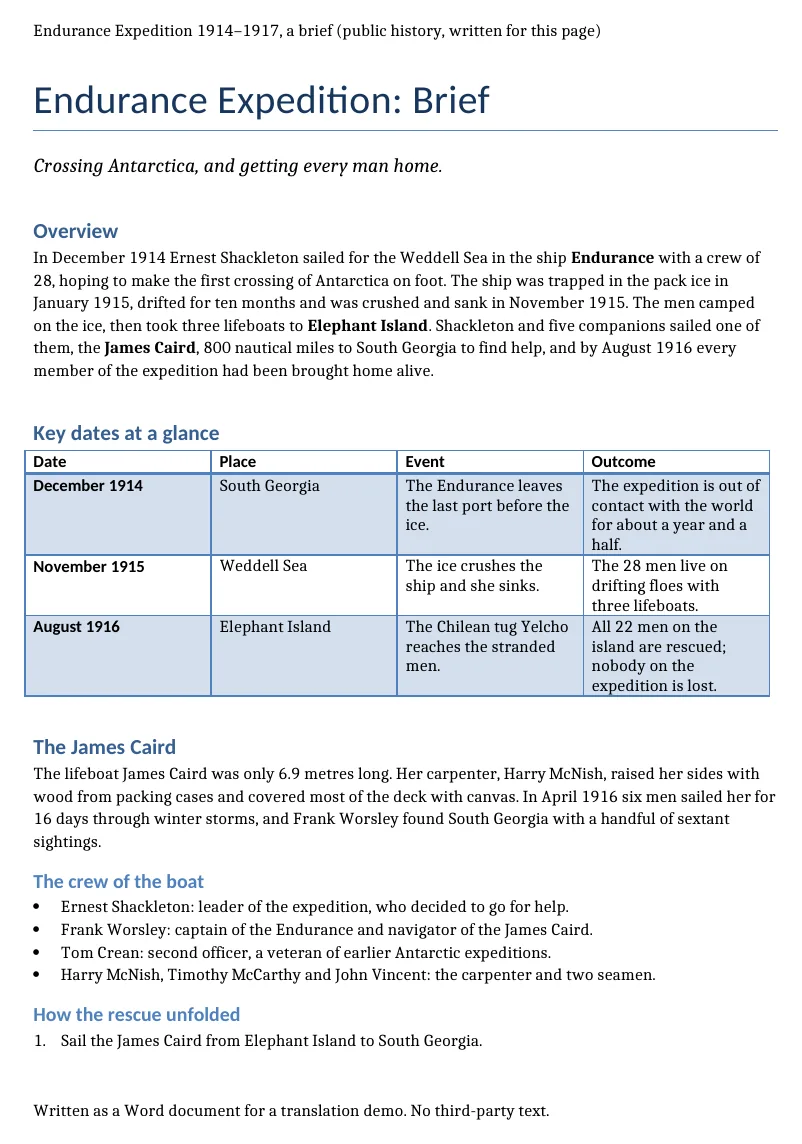
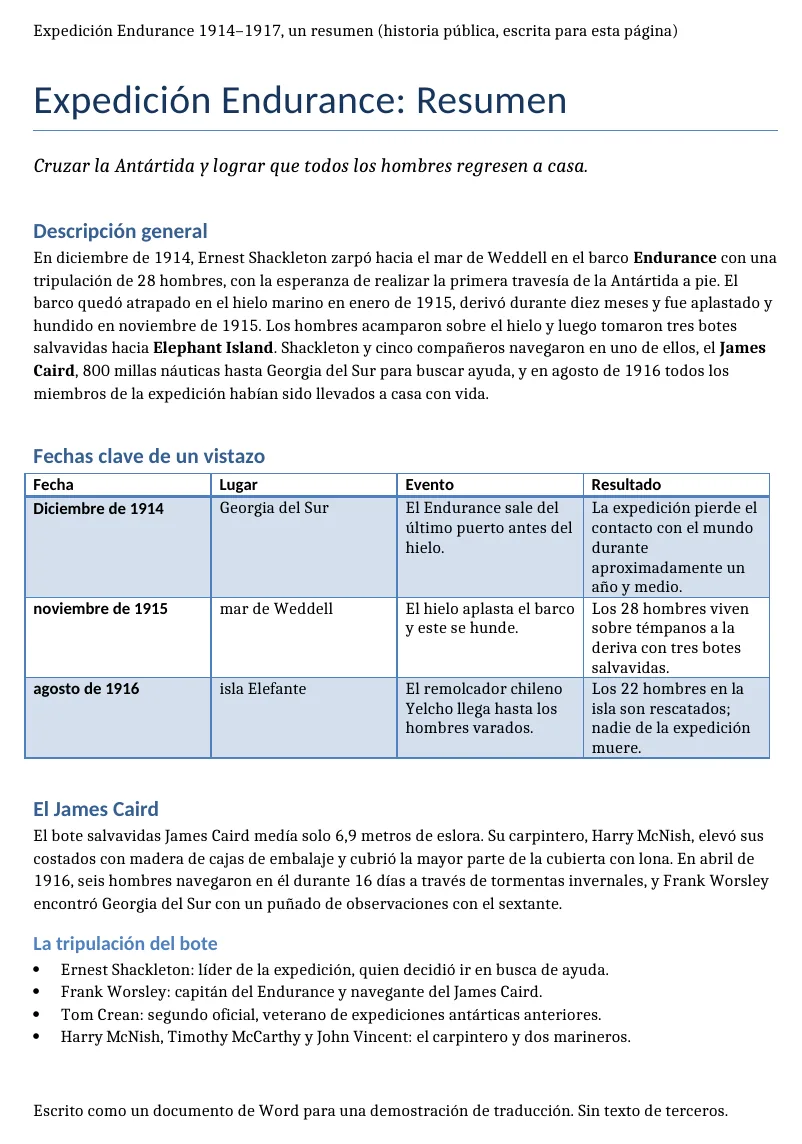
Output preview

Translate Word Documents Online — Styles, Tables & Track Changes layout preview

A translated file is only useful if tables, headings and spacing are still where your team expects them. ForgeFile keeps the document structure visible from upload to download.

Original EN
Q3 supplier agreement
Translated ES
Acuerdo de proveedor Q3

Formats

Translate Word Documents Online — Styles, Tables & Track Changes supported file types

Not every file is a clean PDF. The useful cases are messy: scanned contracts, spreadsheet tabs, slide decks, subtitles and audio exports from meetings.

Office and PDF

Documents, decks and spreadsheets where layout matters.

PDFDOCXPPTXXLSXRTF

Scans and images

Photos, scans and image-heavy PDFs that need text extraction first.

JPGPNGTIFFScanned PDF

Localization files

Structured text files where keys, timings and markup should stay intact.

CSVJSONXMLSRTVTT

Translate Word Documents Online — Styles, Tables & Track Changes features

Styles & Font Preservation

Every paragraph style, font, color and layout detail stays exactly as in the original. Your translated Word document opens cleanly in Word, Google Docs or LibreOffice — no reformatting needed.

Tables, Lists & Charts

Complex tables, nested lists, charts and embedded diagrams are translated accurately. Cell structure, column widths and data formatting remain intact and ready for business use.

Track Changes & Comments

Revision history, tracked changes and comments are fully preserved during translation. Your collaboration workflow stays intact — reviewers see changes in the right context.

100+ Languages, Including RTL & CJK

Translate DOC and DOCX files between 100+ languages: Spanish, French, German, Arabic, Chinese, Japanese, Korean, Portuguese, Russian and many more — with full RTL and CJK script support.

How to Translate a Word Document Online in 4 Steps

  1. 1

    Upload Your Word Document

    Drag and drop your .doc or .docx file, or click to browse. Supports business proposals, legal contracts, research papers and more.

  2. 2

    Select Languages

    Choose from 100+ languages. ForgeFile auto-detects the source language — just pick your target and go.

  3. 3

    Configure & Translate

    Choose whether to preserve track changes and comments. Select output as translated DOCX or convert to PDF for easy sharing.

  4. 4

    Download Your Translated Document

    Your translated Word file is ready in minutes. All styles, tables, images and comments are preserved — download and use immediately.

Why ForgeFile Is the Best Word Document Translator

Need to translate a Word document without losing the formatting? ForgeFile is an AI-powered DOC and DOCX translator that converts your documents into 100+ languages while keeping every style, font, table, image, comment and tracked change intact. Whether it's a contract, research paper, HR manual or company report — your translated Word file looks exactly like the original, ready to use without any manual cleanup.

How ForgeFile Translates DOC & DOCX Files

Generic translation tools strip Word formatting into plain text. ForgeFile parses the internal XML structure of your document before translating anything. When you translate a DOCX file, the engine:

  • Maps every paragraph, heading, table cell, list item and styled element
  • Translates text using context-aware AI that handles domain-specific terminology — legal, medical, financial, technical
  • Rebuilds the document with translated content in the original layout — fonts, colors, spacing and all

The result is a Word document that opens cleanly in Microsoft Word, Google Docs or LibreOffice with zero reformatting needed.

Full Support for Both DOC and DOCX

ForgeFile handles both modern .docx files and legacy .doc format. Regardless of which version of Word created the file, the translator preserves:

  • Paragraph styles, fonts, colors and text formatting
  • Complex tables, nested lists and embedded charts
  • Headers, footers and page numbering
  • Track changes, comments and revision history
  • Embedded images, shapes, diagrams and hyperlinks

Why Choose ForgeFile for Word Document Translation

  • True formatting preservation — styles, tables and images stay exactly where they belong, unlike Google Translate or DeepL which flatten Word structure
  • DOC & DOCX support — both modern and legacy Word formats handled identically
  • Track changes intact — revision history and comments survive the translation, keeping your collaboration workflow intact
  • 100+ languages — including right-to-left scripts (Arabic, Hebrew) and CJK characters (Chinese, Japanese, Korean)
  • Fast results — most Word documents translated in under 3 minutes
  • No software to install — works entirely in your browser on any device
  • Enterprise-grade security — encrypted processing, automatic file deletion, zero data retention

Who Uses ForgeFile for Word Translation?

  • Legal teams — NDAs, agreements, compliance docs with consistent terminology across languages
  • Business & finance — annual reports, proposals and internal memos for global teams
  • Academia & research — journal manuscripts, grant applications and theses
  • HR & administration — employee handbooks, policies and onboarding materials for international offices

Bulk translation and API access are available for teams processing high volumes. All files are encrypted in transit and at rest, with automatic deletion after processing — fully GDPR-compliant.

Upload your Word document now and see why professionals trust ForgeFile for accurate, format-preserving DOC and DOCX translation.

Word Document Translation FAQ — Common Questions Answered

How do I translate a Word document online?

Upload your DOC or DOCX file to ForgeFile, select your target language and click Translate. The AI delivers a fully translated Word document with all formatting preserved — typically in under 3 minutes.

Can I translate a Word document without losing formatting?

Yes. ForgeFile parses the internal structure of your Word file and rebuilds the document after translation — keeping every style, table, image, font and spacing exactly as in the original.

Can I translate both DOC and DOCX files?

Yes. ForgeFile supports both modern .docx and legacy .doc formats. Both are translated with full formatting preservation — styles, tables, images and layout.

Are track changes and comments preserved after translation?

Yes. Track changes, comments and revision history are fully preserved during translation. Your collaboration workflow stays intact for reviewers.

Does the translation preserve tables and images?

Absolutely. ForgeFile maps every table, image, chart and embedded object before translation and rebuilds the document with translated text in the exact same layout.

Is there a free Word document translator online?

ForgeFile offers a free tier so you can try DOCX translation without a credit card. Upload your file, translate it and download the result to see the quality before committing to a plan.

What languages can I translate my Word document to?

ForgeFile supports 100+ languages including Spanish, French, German, Italian, Portuguese, Russian, Arabic, Hebrew, Chinese, Japanese, Korean, Hindi and many more — with full RTL and CJK script support.

What is the maximum file size for Word translation?

You can translate Word documents up to 10 MB on standard plans. For larger files or bulk translation needs, enterprise plans with higher limits and API access are available.

Translate Word Documents Online — Styles, Tables & Track Changes output

Upload your DOC or DOCX file and get professional-quality translation in minutes. Formatting preserved, every time.