
Encoding Detection
Auto-detects UTF-8, ANSI, Latin-1, and other encodings. Your translated file outputs clean, properly encoded text ready for any system.
Translate plain text files online in 100+ languages with AI that preserves line breaks, encoding, and structure for logs, scripts, and data exports.
Translation example
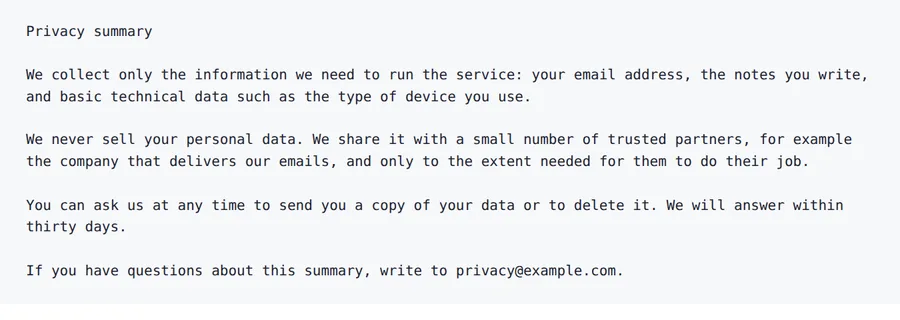
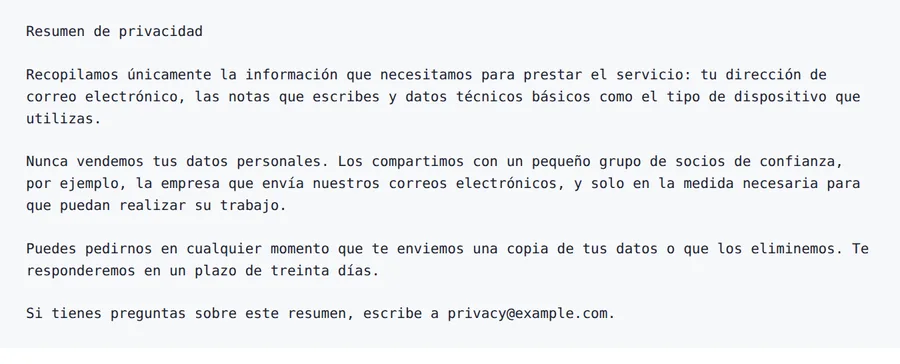
A five-paragraph privacy summary written for this page. Paragraph breaks and the e-mail address stay; the text speaks to the reader as "tú" from the first sentence to the last.
Source
Result
2026-10-08 verified — Amanda Lee
Auto-detects UTF-8, ANSI, Latin-1, and other encodings. Your translated file outputs clean, properly encoded text ready for any system.
Upload and translate multiple TXT files at once. Ideal for high-volume workflows with logs, documentation, and content files.
Translate TXT files between 100+ languages including Spanish, French, German, Arabic, Chinese, Japanese, and Korean.
Need to translate a TXT file and get back something your tools still read? ForgeFile is an AI-powered plain text translator that converts .txt files into 100+ languages and writes the result back in the encoding it arrived in.
A .txt file carries no markup to protect, so all of it is translated. What ForgeFile looks after is the shape of the file:
If the file uses headings, links or code fences, upload it as .md instead: the Markdown workflow leaves that syntax untouched and translates the prose around it. A file sent as .txt is treated as prose from the first character to the last.
Correct handling of multilingual plain text depends on the Unicode Standard.
Upload Your Text File
Drag and drop your .txt file, or browse to select it. We support files with automatic encoding detection.
Select Source & Target Language
Choose from 100+ languages. ForgeFile auto-detects the source language and text encoding for maximum compatibility.
Configure Translation Settings
Choose output encoding (UTF-8, ANSI, etc.) and whether to preserve or normalize line endings across platforms.
Download Your Translated File
ForgeFile auto-detects and supports UTF-8, ANSI, Latin-1, Windows-1252, and other common encodings. The translated file outputs clean, properly encoded text.
Yes. ForgeFile supports batch processing - upload multiple text files and translate them all in a single operation. Ideal for logs, documentation, and content workflows.
Absolutely. All line breaks, indentation, blank lines, and list structures are preserved exactly as in the original file.
The maximum file size depends on your plan. For larger files or bulk translation needs, contact us about enterprise plans with higher limits and API access.
Yes. ForgeFile handles server logs, error reports, code comments, README files, changelogs, and any other plain text content.
Upload your .txt file to ForgeFile, select your target language, and click Translate. The AI translates the text while keeping line breaks, indentation and blank lines where they were, and writes the result back in the same encoding.
Files are encrypted in transit and at rest. How long they are kept depends on your plan.
A .txt file is plain prose, so everything in it is translated. A .md file carries syntax - headings, links, code blocks - which the Markdown workflow leaves untouched while translating the prose around it. If your file uses Markdown, upload it as .md.
Translate plain text files online in 100+ languages with AI that preserves line breaks, encoding, and structure for logs, scripts, and data exports.