
Tag & Code Preservation
Every HTML tag, attribute, CSS class, and script reference stays intact. Your translated file is valid, production-ready code.
Upload any HTML file and get an accurate translation in 100+ languages. Tags, attributes, CSS classes, SEO metadata, and structured data - all preserved.
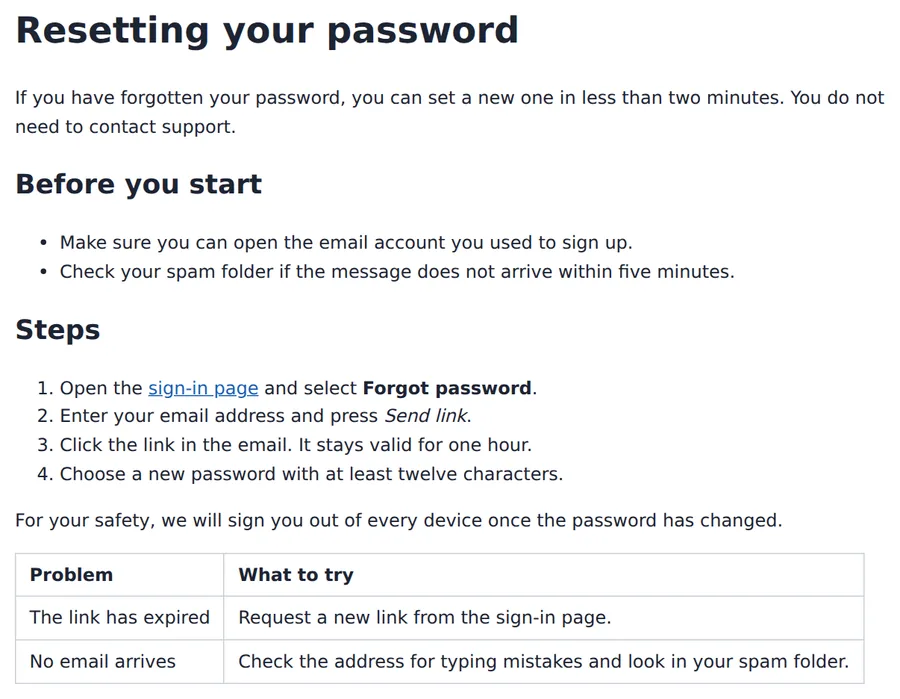
Translation example
A help-centre article with headings, lists, a link, bold and italic labels, a note and a table, written for this page. The tags, attributes and link targets come back as they were; the sentences, the link caption, the labels, the title and the meta description are translated. The pictures below are the two files rendered with a plain stylesheet added for the screenshot.
Source
Result
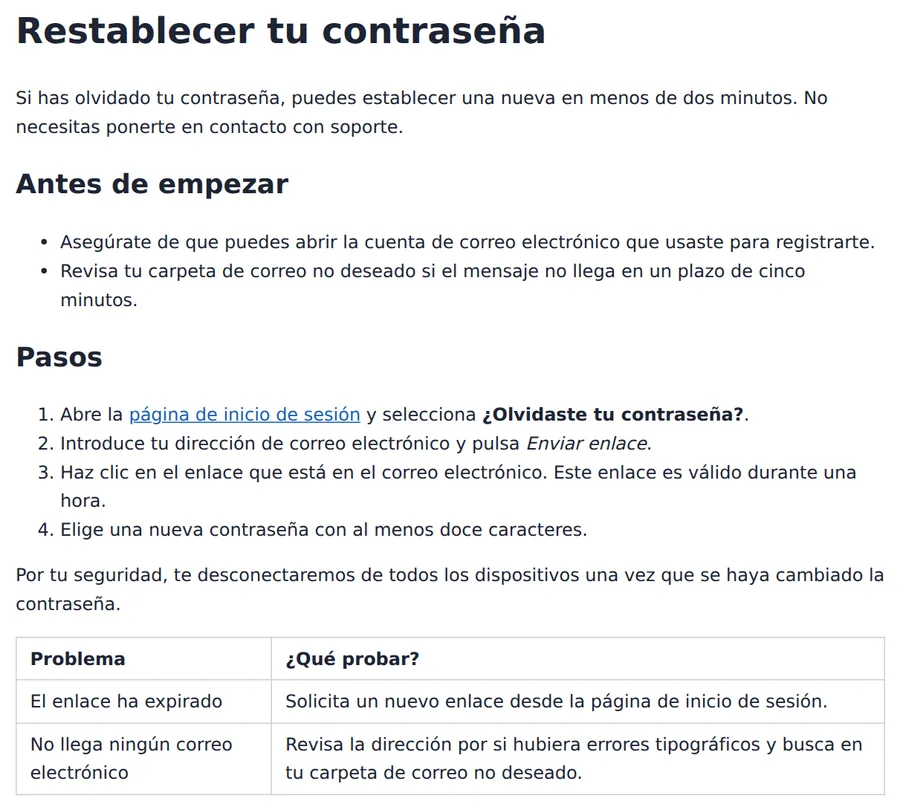
The sequence of tags is identical before and after.
Every href, class and id comes back as it was.
<html lang="en"> → <html lang="es">
22 of 22 text fragments with words differ from the source; the only others are lone full stops.
2026-10-08 verified — Amanda Lee
Every HTML tag, attribute, CSS class, and script reference stays intact. Your translated file is valid, production-ready code.
Meta titles, descriptions, Open Graph tags, structured data, and hreflang attributes are translated and kept valid for search engines.
Cloud-based AI infrastructure handles complex pages with deep DOM structures.
Translate HTML files between 100+ languages including Spanish, French, German, Arabic, Chinese, Japanese, and Korean.
Need to translate an HTML file without breaking your code or SEO? ForgeFile is an AI-powered HTML translator that converts your web pages into 100+ languages while preserving every tag, attribute, CSS class, and SEO element. Whether it's a landing page, an e-commerce product page, or a documentation site, your translated HTML is production-ready and fully functional.
Our translation engine parses the DOM structure before translating. When you translate an HTML file, ForgeFile:
The result is a valid, production-ready HTML file you can deploy immediately - no manual code fixes needed.
Unlike basic translation tools that strip or corrupt SEO elements, ForgeFile protects everything search engines rely on:
ForgeFile handles the HTML files web professionals work with every day:
Batch translation is available for entire website directories. All files are encrypted in transit and at rest - fully GDPR-compliant.
Upload your HTML file now for accurate, SEO-safe website translation.
HTML markup is defined by the WHATWG HTML Living Standard.
Upload Your HTML File
Drag and drop your . html file, or browse to select it. The maximum file size depends on your plan.
Select Source & Target Language
Choose from 100+ languages. ForgeFile auto-detects the source language and preserves SEO attributes during translation.
Configure Translation Settings
Choose whether to translate meta tags, alt text, and ARIA labels. Select output encoding and character set.
Download Your Translated HTML
Your translated HTML file is ready in minutes. All tags, SEO elements, and code structure are preserved - deploy directly to your server.
Upload your HTML file to ForgeFile, select your target language, and click Translate. Our AI translates visible text content while preserving all tags, attributes, and code structure.
Absolutely. ForgeFile parses the DOM and translates only text content. All tags, attributes, CSS classes, inline styles, and script references remain untouched.
Yes. Meta titles, descriptions, Open Graph tags, structured data (JSON-LD), hreflang attributes, and canonical URLs are all preserved and translated where appropriate.
Yes. ForgeFile supports batch processing - upload multiple HTML files from your site directory and translate them all in a single operation.
No. ForgeFile only translates visible text content. CSS, JavaScript, inline scripts, and external resource references are never modified.
For larger files or bulk website translation, contact us about enterprise plans with higher limits and API access. The maximum file size depends on your plan.
Files are encrypted in transit and at rest. How long they are kept depends on your plan.
Browser translation (like Google Chrome) only translates the visible page temporarily. ForgeFile translates the actual HTML source file - producing a permanent, deployable, SEO-optimized translated page.
Upload your HTML files and get production-ready translated pages in minutes. Tags, SEO, and layout preserved, every time.