
Column & Row Preservation
Every column, row, merged cell, and header stays exactly in place. Your translated table imports into any BI tool or database.
Upload any table file and get an accurate translation in 100+ languages. Columns, rows, headers, formulas, and formatting - all preserved. Import-ready output.
Translation example
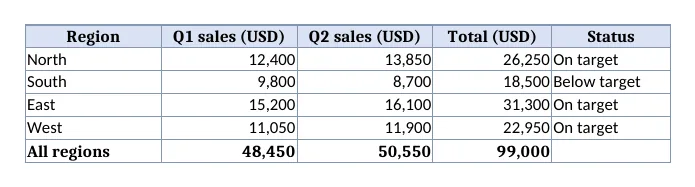
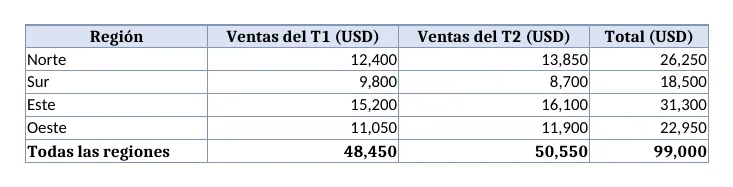
A regional sales table written for this page: a shaded header, numbers, per-row totals as formulas, a grand total with SUM, and a notes sheet. Formulas and numbers must come back untouched while the words around them are translated.
Source
Result
=B2+C2, =B3+C3, =B4+C4, =B5+C5, =SUM(B2:B5), =SUM(C2:C5), =SUM(D2:D5)
12400, 13850, 9800, 8700, 15200, 16100, 11050, 11900
Region → Región; number format #,##0
Sales by region, Notes → Ventas por región, Notas
2026-10-08 verified — Amanda Lee
Every column, row, merged cell, and header stays exactly in place. Your translated table imports into any BI tool or database.
Numbers, dates, formulas, and identifiers are never modified. Only text fields are translated - your data stays clean and import-ready.
Cloud-based AI handles files with thousands of rows and complex cell relationships.
Translate tables between 100+ languages including Spanish, French, German, Arabic, Chinese, Japanese, and Korean.
Need to translate a table or spreadsheet without breaking your data structure? ForgeFile is an AI-powered table translator that converts your tabular data into 100+ languages while preserving every column, row, header, formula, and cell format. Whether it's a financial report, an analytics export, or a research dataset, your translated table is import-ready and fully functional.
Our translation engine understands tabular data structure. When you translate a table, ForgeFile:
The result is a clean, structured table you can import directly into any BI tool, database, or reporting system - no broken columns, no shifted data.
ForgeFile works with all major table and spreadsheet formats:
Upload in one format, download in the same or convert - flexible output for every workflow.
ForgeFile handles the tabular data professionals work with every day:
Bulk translation and API access are available for automated data pipelines. All files are encrypted in transit and at rest - fully GDPR-compliant.
Upload your table now for accurate, structure-safe table translation.
The underlying CSV structure many spreadsheet exports use is defined in RFC 4180.
Upload Your Table File
Drag and drop your Excel, CSV, or ODS file. The maximum file size depends on your plan.
Select Source & Target Language
Choose from 100+ languages. ForgeFile auto-detects the source language and identifies which columns contain translatable text.
Configure Translation Settings
Choose which columns to translate and which to skip. Select output format (XLSX, CSV, or ODS) for your workflow.
Download Your Translated Table
Your translated table is ready in minutes. All columns, rows, headers, and formatting are preserved - import directly into your system.
Upload your table file (Excel, CSV, or ODS) to ForgeFile, select your target language, and click Translate. Our AI identifies text columns and translates them while preserving all data structure.
Absolutely. ForgeFile preserves every column position, header, row order, merged cell, and cell format. Your translated table imports cleanly.
No. ForgeFile analyzes column types and translates only text content. Numbers, dates, formulas, IDs, and codes are never modified.
ForgeFile supports Excel (XLSX, XLS), CSV, ODS (OpenDocument Spreadsheet), and TSV. You can upload in one format and download in another.
Yes. You can select specific columns for translation and exclude others - ideal for tables with mixed data and text content.
Yes. ForgeFile handles tables with thousands of rows and complex structures. The maximum file size depends on your plan.
Files are encrypted in transit and at rest. How long they are kept depends on your plan.
Table translation is a universal service that accepts Excel, CSV, ODS, and TSV formats. CSV translation is optimized specifically for comma-separated data files. Both preserve structure and data integrity.
Upload your table file and get structure-safe translation in minutes. Columns, headers, and formatting preserved, every time.