
Timestamp Preservation
Every subtitle appears and disappears at exactly the right moment. Timestamps and sequence numbers are never modified during translation.
Upload any SRT subtitle file and get an accurate translation in 100+ languages. Timestamps, sequence numbers, and formatting - all preserved.
Translation example
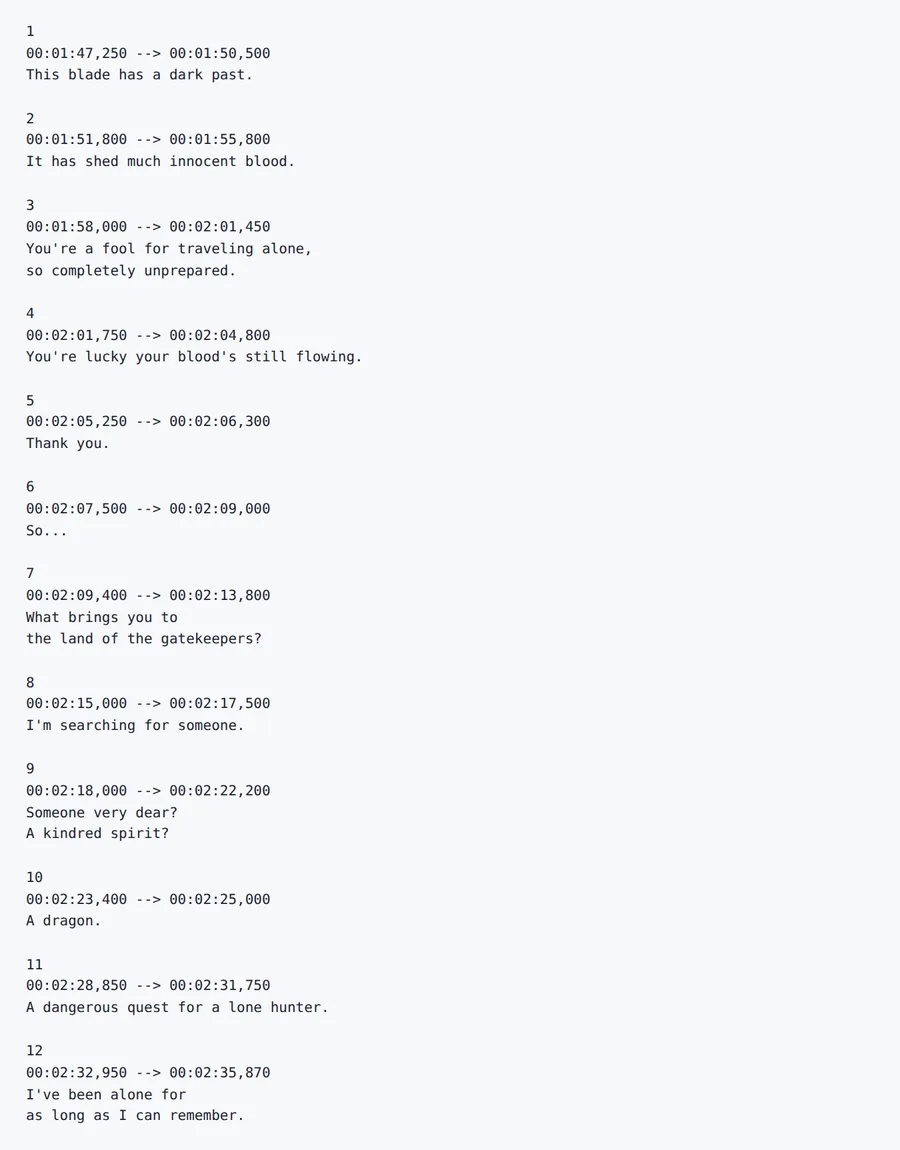
The first twelve cues of Sintel, with the numbering and every timestamp kept. Subtitles: Sintel © Blender Foundation | durian.blender.org, licensed CC BY 3.0. All 26 cues were counted.
Source
Result
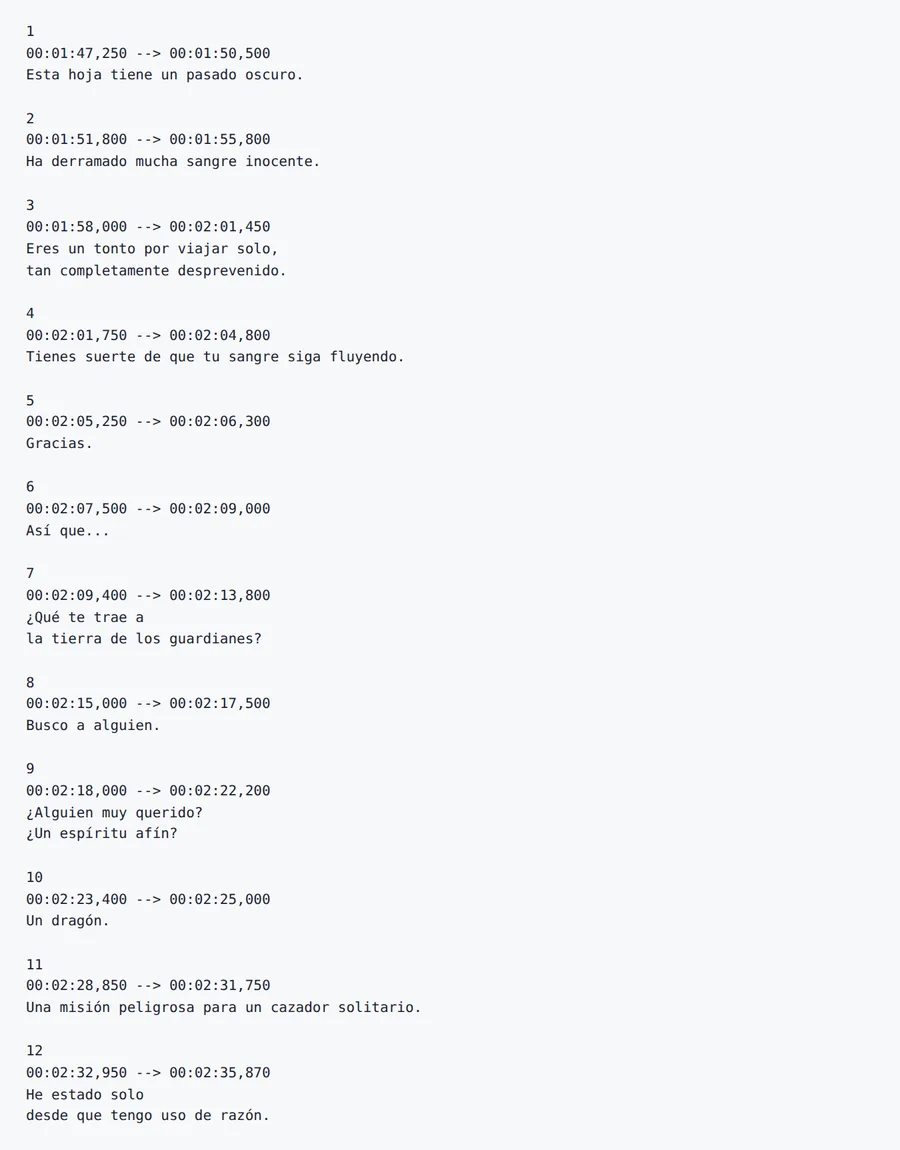
The dragon "Scales" comes back as "Escamas" in most cues and "Escalas" in the last one. Fix names with a glossary.
2026-10-08 verified — Amanda Lee
Every subtitle appears and disappears at exactly the right moment. Timestamps and sequence numbers are never modified during translation.
Our AI understands spoken language patterns, idioms, and conversational tone. Translations sound natural - not like machine-generated text.
Translate subtitles between 100+ languages including Spanish, French, German, Arabic, Chinese, Japanese, and Korean.
Upload and translate multiple SRT files at once. Ideal for series, courses, and multi-episode video projects.
Need to translate subtitles without losing sync with your video? ForgeFile is an AI-powered SRT subtitle translator that converts your subtitle files into 100+ languages while preserving every timestamp, sequence number, and formatting tag. Whether it's a YouTube video, an online course, or a feature film, your translated subtitles stay synchronized.
Our translation engine understands the SRT subtitle format. When you translate an SRT file, ForgeFile:
The result is a ready-to-upload subtitle file that stays in sync with your video - no manual timing adjustments needed.
Subtitles are not just text - they are spoken dialogue with context, tone, and rhythm. ForgeFile's AI handles the unique challenges of subtitle translation:
ForgeFile handles the subtitle workflows professionals rely on:
Batch translation is available for series and multi-episode projects. All files are encrypted in transit and at rest - fully GDPR-compliant.
The SubRip (SRT) subtitle format is documented by the Library of Congress's digital format sustainability project.
Upload Your SRT File
Drag and drop your .srt subtitle file, or browse to select it. We support standard SRT files from any video editing or captioning tool.
Select Source & Target Language
Choose from 100+ languages. ForgeFile auto-detects the source language and understands dialogue context for natural-sounding translations.
Configure Translation Settings
Choose whether to preserve formatting tags (bold, italic) and select concise or expanded translation style for subtitle readability.
Download Your Translated Subtitles
Your translated SRT file is ready in minutes. All timestamps and sync points are preserved - upload directly to YouTube, Vimeo, or any video platform.
Upload your SRT file to ForgeFile, select your target language, and click Translate. Our AI translates the dialogue while preserving all timestamps and sync.
Absolutely. ForgeFile never modifies timestamps or sequence numbers. Every subtitle appears and disappears at exactly the same moment as the original.
Yes. The translated SRT file is fully compatible with YouTube, Vimeo, and all major video platforms. Upload it directly as a subtitle track.
Yes. ForgeFile's AI is trained on conversational language patterns. It handles idioms, slang, and informal speech naturally - producing subtitles that sound human, not robotic.
Yes. ForgeFile supports batch processing - upload multiple subtitle files for a series or course and translate them all in a single operation.
Yes. Bold, italic, color, and other SRT formatting tags are fully preserved in the translated output.
Files are encrypted in transit and at rest. How long they are kept depends on your plan.
Manual subtitle translation takes hours per video and risks timing errors. ForgeFile translates the entire file and keeps the original timestamps - and handles batch files for series and courses.
Upload your SRT file and get translated subtitles that keep the original timing. Timestamps preserved, every time.