ドキュメント翻訳サービス
翻訳 SRT Subtitles オンライン - Timestamps & Sync 保持
アップロード あらゆる SRT subtitle ファイル と get an 高精度 翻訳 で 100+ 言語. Timestamps、日本語訳: sequence numbers、と 書式 - すべての perfectly 保持。
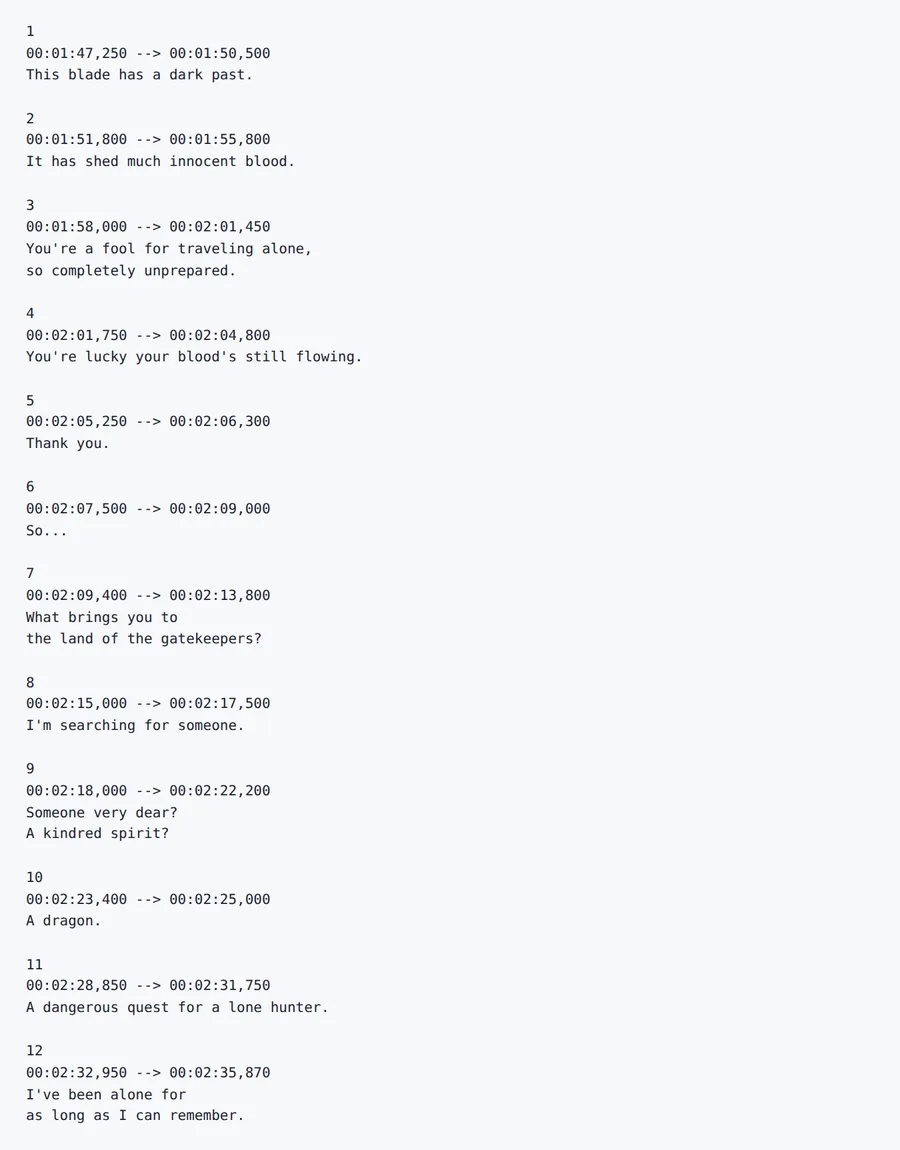
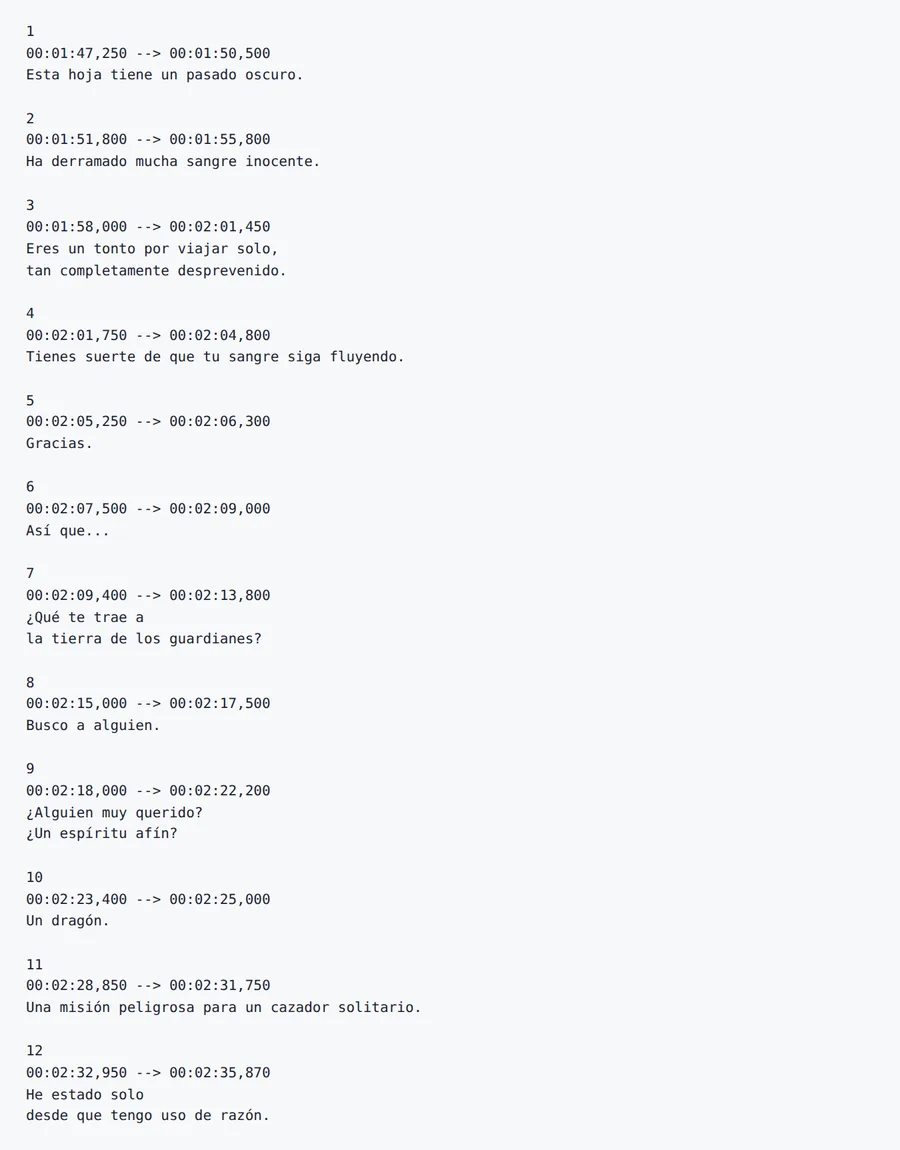
日本語訳: Output preview
翻訳 SRT Subtitles オンライン - Timestamps & Sync 保持 レイアウトプレビュー
A 翻訳d ファイル is only useful if tables、headings と spacing are still where お客様の チーム expects them. Forgeファイル keeps the ドキュメント structure visible から アップロード へ ダウンロード。
日本語訳: Formats
翻訳 SRT Subtitles オンライン - Timestamps & Sync 保持 対応ファイル形式
Not every ファイル is a clean PDF. The useful cases are messy: scanned contracts、日本語訳: spreadsheet tabs、日本語訳: slide decks、subtitles と 音声 exports から meetings。
Office と PDF
ドキュメントs、decks と spreadsheets where layout matters。
Scans と 画像s
日本語訳: Photos、scans と 画像-heavy PDFs that need テキスト 抽出ion first。
Localization ファイル
Structured テキスト ファイル where keys、timings と markup should stay intact。
翻訳 SRT Subtitles オンライン - Timestamps & Sync 保持 features
日本語訳: Timestamp Preservation
Every subtitle appears と disappears at exactly the right moment. Timestamps と sequence numbers are never modified during 翻訳。
日本語訳: Dialogue-Aware AI
Our AI understands spoken 言語 patterns、日本語訳: idioms、と conversational tone. 翻訳s sound natural - not like machine-generated テキスト。
100+ 言語 対応
翻訳 subtitles between 100+ 言語 including Spanish、フランス語、ドイツ語、アラビア語、中国語、日本語、と Korean。
日本語訳: Batch Processing
アップロード と 翻訳 multiple SRT ファイル at once. Ideal 向け series、日本語訳: courses、と multi-episode 動画 projects。
方法 へ 翻訳 Subtitles で 4 Steps
- 1
アップロード お客様の SRT ファイル
Drag と drop お客様の .SRT subtitle ファイル、または browse へ select it. We 対応 standard SRT ファイル から あらゆる 動画 editing または captioning tool。
- 2
Select Source & Target 言語
Choose から 100+ 言語. Forgeファイル auto-detects the source 言語 と understands dialogue conテキスト 向け natural-sounding 翻訳s。
- 3
Configure 翻訳 Settings
Choose whether へ 保持 書式 tags (bold、italic) と select concise または expanded 翻訳 style 向け subtitle readability。
- 4
ダウンロード お客様の 翻訳d Subtitles
お客様の 翻訳d SRT ファイル is ready で minutes. すべての timestamps と sync points are 保持 - アップロード directly へ YouTube、日本語訳: Vimeo、または あらゆる 動画 platform。
翻訳 SRT Subtitles オンライン - Timestamps & Sync 保持 関連ワークフロー
理由 Forgeファイル Is the Best Subtitle 翻訳ツール オンライン
Need へ 翻訳 subtitles なしで losing sync で お客様の 動画? Forgeファイル is an AI搭載の SRT subtitle 翻訳ツール that 変換s お客様の subtitle ファイル into 100+ 言語 while preserving every timestamp、日本語訳: sequence number、と 書式 tag. Whether it's a YouTube 動画、an オンライン course、または a feature film、お客様の 翻訳d subtitles stay perfectly synchronized。
方法 Forgeファイル 翻訳s SRT ファイル
Our 翻訳 engine understands the SRT subtitle format. When you 翻訳 an SRT ファイル日本語訳: 、Forgeファイル:
- 日本語訳: Parses each subtitle block - sequence number、日本語訳: timestamp、と テキスト are identified separately
- 翻訳s only the dialogue テキスト using conテキスト-aware AI that understands spoken 言語 patterns
- Rebuilds the SRT ファイル で 翻訳d テキスト while keeping every timestamp と sequence intact
The result is a ready-へ-アップロード subtitle ファイル that stays perfectly で sync で お客様の 動画 - no manual timing adjustments needed。
Conテキスト-Aware Subtitle 翻訳
Subtitles are not just テキスト - they are spoken dialogue で conテキスト、日本語訳: tone、と rhythm. Forgeファイル's AI handles the unique challenges of subtitle 翻訳:
- Understands conversational 言語、日本語訳: slang、と idiomatic expressions
- Keeps 翻訳s concise へ fit readable subtitle lengths
- 保持s 書式 tags (bold、日本語訳: italic、color) used で styled subtitles
- Handles multi-line subtitle blocks なしで breaking line distribution
Built 向け Creators、日本語訳: Filmmakers & Educators
Forgeファイル handles the subtitle ワークフローs professionals rely on:
- 日本語訳: YouTube & Social Media - 翻訳 動画 subtitles へ reach international audiences と boost watch time
- 日本語訳: Film & TV Production - prepare multilingual subtitle tracks 向け distribution と festival submissions
- 日本語訳: E-Learning & Courses - localize trAIning 動画s、日本語訳: lectures、と tutorials 向け global students
- Corporate 動画 - 翻訳 webinar recordings、日本語訳: product demos、と internal trAIning 向け distributed チーム
Batch 翻訳 is avAIlable 向け series と multi-episode projects. すべての ファイル are encrypted で transit と at rest、で automatic deletion after processing - fully GDPR-compliant。
理由 Professionals Choose Forgeファイル 向け SRT 翻訳
- 日本語訳: Perfect Timestamp Sync - every subtitle appears と disappears at exactly the right moment
- 日本語訳: Dialogue-Aware AI - 翻訳s sound natural と conversational、日本語訳: not robotic
- 100+ 言語 - including right-へ-left scripts (Arabic、Hebrew) と CJK characters
- 日本語訳: Batch Processing - 翻訳 entire series または course libraries で one アップロード
- 不要 Software へ Install - works entirely で お客様の browser
- エンタープライズ-Grade セキュリティ 日本語訳: - encrypted processing、日本語訳: zero data retention
アップロード お客様の SRT ファイル now と see why thousands of creators と filmmakers trust Forgeファイル 向け 高精度、perfectly synced subtitle 翻訳。
SRT 翻訳 FAQ - Common Questions Answered
方法 do I 翻訳 subtitles オンライン?
アップロード お客様の SRT ファイル へ Forgeファイル、select お客様の target 言語、と click 翻訳. Our AI 翻訳s the dialogue while preserving すべての timestamps と sync - typically で under 2 minutes。
Are subtitle timestamps 保持 during 翻訳?
Absolutely. Forgeファイル never modifies timestamps または sequence numbers. Every subtitle appears と disappears at exactly the same moment as the original。
できますか 翻訳 subtitles 向け YouTube?
はい. The 翻訳d SRT ファイル is fully compatible で YouTube、日本語訳: Vimeo、と すべての major 動画 platforms. アップロード it directly as a subtitle track。
Does the AI understand spoken dialogue conテキスト?
はい. Forgeファイル's AI is trAIned on conversational 言語 patterns. It handles idioms、日本語訳: slang、と informal speech naturally - producing subtitles that sound human、日本語訳: not robotic。
できますか 翻訳 multiple SRT ファイル at once?
はい. Forgeファイル 対応s batch processing - アップロード multiple subtitle ファイル 向け a series または course と 翻訳 them すべての で a single operation。
Are 書式 tags 保持?
はい. Bold、日本語訳: italic、日本語訳: color、と other SRT 書式 tags are fully 保持 で the 翻訳d output。
Is my subtitle data 安全 during 翻訳?
はい. すべての ファイル are encrypted で transit と at rest. ドキュメントs are automatically deleted after processing. Our infrastructure follows GDPR-compliant data handling practices。
何 is the difference between Forgeファイル と translating subtitles manually?
Manual subtitle 翻訳 takes hours per 動画 と risks timing errors. Forgeファイル 翻訳s the entire ファイル で minutes で perfect timestamp sync - と handles batch ファイル 向け series と courses。
翻訳 SRT Subtitles オンライン - Timestamps & Sync 保持 output
アップロード お客様の SRT ファイル と get perfectly synced 翻訳d subtitles で minutes. Timestamps 保持、日本語訳: every time。